• Skip to primary navigation
  • Skip to main content
CRM Junction – SuiteCRM Specialists

CRM Junction - SuiteCRM Specialists

The Home Of SuiteCRM Cloud Computing

  • Home
  • Features
  • Support Services
  • Training
    • Understanding Workflows
    • Understanding ‘The Cloud’
  • Pricing
  • Why SuiteCRM
  • Articles
  • Contact
    • Payments

SuiteCRM

SuiteCRM Essentials – Cron Jobs [VIDEO]

August 25, 2019 by chrisely

SuiteCRM is the world’s number 1 Open Source CRM system and Cronjobs/Workflows play a big part in why.

Workflows are automated processes that trigger on changes to something within the system.  They can be triggered by a change of field status in a record or by something like a new record being added.

Cron is a Linux utility which schedules a command or script on your server to run automatically at a specified time and date. A cron job is the scheduled task itself. Cron jobs can be very useful to automate repetitive tasks. … Scripts executed as a cron job are typically used to modify files or databases.

So SuiteCRM Workflows can be triggered by a field or status being updated but what if you want to make a change or say send an email to a client that has not ordered anything for a period of time.  This is where the scheduler and cron jobs come in handy.

A cron job can be scheduled to ping the system say every 2 minutes or just once per hour.  On busy sites, I tend to run them every 2 minutes.  I will cover cron jobs and scheduled Workflows in much more detail in a later lesson.  For now, lets setup the cron jobs.

Cron jobs can be setup in your hosting CPanel but I find it much easier and more manageable to setup cron jobs through the ‘Easycron’ service which handles the scheduling for a very small fee.  Believe me, it’s worth it.

For those of you who want to learn more about SuiteCRM scheduler and cron jobs, head over to the SuiteCRM website and look for ‘Scheduler Jobs in SuiteCRM in Linux – the Definitive Guide’

To setup cron jobs, you need to have access to an FTP client.  I use Filezilla.  You will need to make to small changes to the cron.php and config.php files in your SuiteCRM root directly.  These are of course, services I can offer you if you are not confident of doing them yourself.

To make changes to a php file you will need to use a text editor like Notepad or an HTML editor.  For simple changes like these, Notepad works just fine.

Just follow the simple steps below to configure cron jobs for your SuiteCRM.

Note:
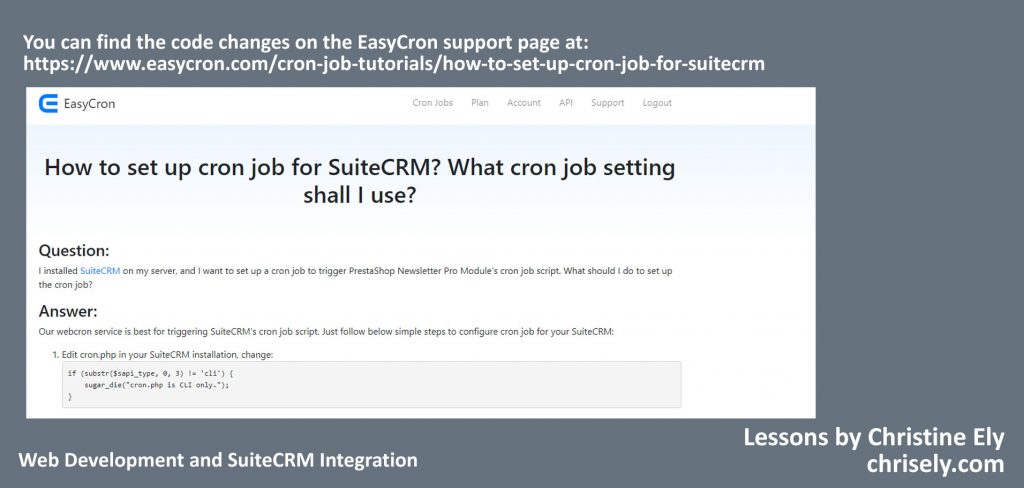
Click image for Easycron support page

Using the ‘All Files’ option in Notepad, first open cron.php and then change the following code from:

if (substr($sapi_type, 0, 3) != ‘cli’) {

    sugar_die(“cron.php is CLI only.”);

}

to :

function easycron_get_ip_address() {

    if (isset($_SERVER[‘HTTP_X_REAL_IP’]) && !empty($_SERVER[‘HTTP_X_REAL_IP’])) {

        return $_SERVER[‘HTTP_X_REAL_IP’];

    } else if (isset($_SERVER[‘HTTP_CLIENT_IP’]) && !empty($_SERVER[‘HTTP_CLIENT_IP’])) {

        return $_SERVER[‘HTTP_CLIENT_IP’];

    } else if (isset($_SERVER[‘HTTP_X_FORWARDED_FOR’]) && !empty($_SERVER[‘HTTP_X_FORWARDED_FOR’])) {

        return $_SERVER[‘HTTP_X_FORWARDED_FOR’];

    } else if (isset($_SERVER[‘REMOTE_ADDR’]) && !empty($_SERVER[‘REMOTE_ADDR’])) {

        return $_SERVER[‘REMOTE_ADDR’];

    } else {

        return ”;

    }

}

$easycron_ip = easycron_get_ip_address();

$easycron_ip_is_from_easycron = false;

if (!empty($easycron_ip)) {

    $easycron_bot_ips_in_json = file_get_contents(‘https://www.easycron.com/ips.json’);

    $easycron_bot_ips = json_decode($easycron_bot_ips_in_json, true);

    if (filter_var($easycron_ip, FILTER_VALIDATE_IP, FILTER_FLAG_IPV4)) {

                if (in_array($easycron_ip, $easycron_bot_ips[‘ipv4’])) {

            $easycron_ip_is_from_easycron = true;

                }

    } else if (filter_var($easycron_ip, FILTER_VALIDATE_IP, FILTER_FLAG_IPV6)) {

        if (in_array($easycron_ip, $easycron_bot_ips[‘ipv6’])) {

            $easycron_ip_is_from_easycron = true;

                }

    }

}

if (!$easycron_ip_is_from_easycron) {

    if (substr($sapi_type, 0, 3) != ‘cli’) {

        sugar_die(“cron.php is CLI only.”);

    }

}

Then save.

I always rename original files that I have edited so before reuploading, rename cron.php in your SuiteCRM folder to old_cron.php

Now upload the edited file.

The true significance of what you are doing now will become clear as you run through my lessons and as your experience with SuiteCRM grows.

Now let’s make the changes to the config.php file as per the instructions on the Easycron support page.

Access the Easycron support page (from here)

Run through the same process as you did with the cron.php code following the instructions in the Easycron guide.  You will be adding your FTP username to the config.php file.

Rename the old file in the SuiteCRM root and upload your edited file.

Now update your Easycron dashboard with your credentials:

Open your cron job dashboard, click on ” Cron Job” button and enter the relevant details for your installation.

In field “URL to call”, enter http://www.example.com/cron.php (set cron job to run every minute)

(replace www.example.com with your install location). Checkout below screenshot:
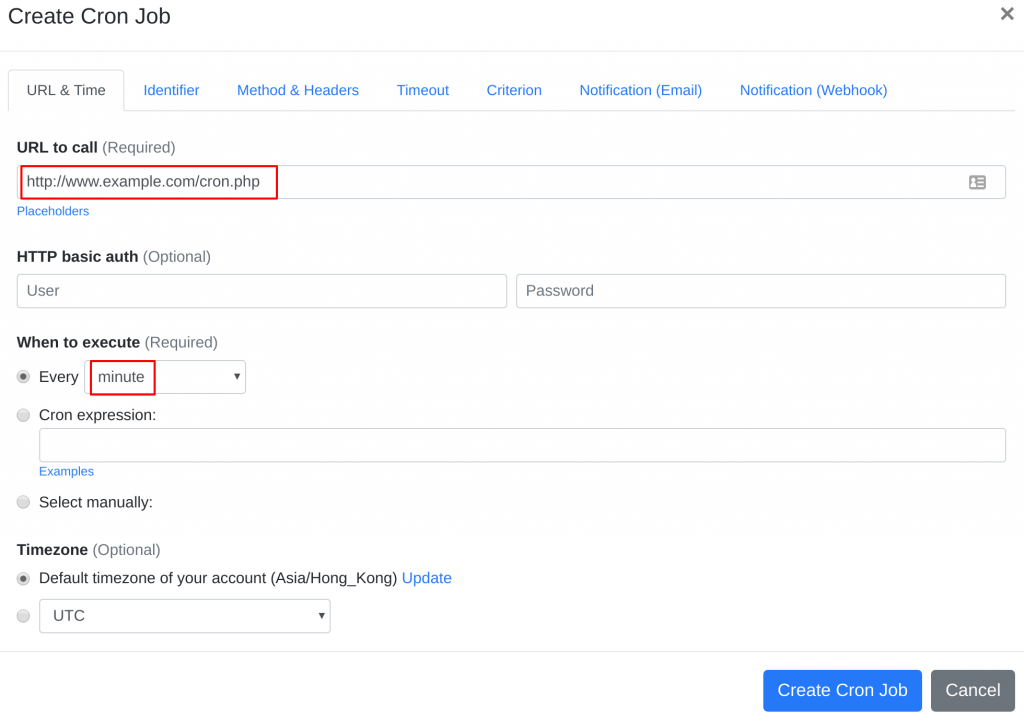
Your suiteCRM cron job should now be able to get triggered successfully from EasyCron.


Filed Under: SuiteCRM

SuiteCRM Essentials – Email Settings [VIDEO]

August 24, 2019 by chrisely

When you start SuiteCRM for the first time you will need to setup your outgoing email.  The outgoing email is essential as it handles all of the automated messages as well as Workflow based emails, Email Responders and direct emails to your Contacts.

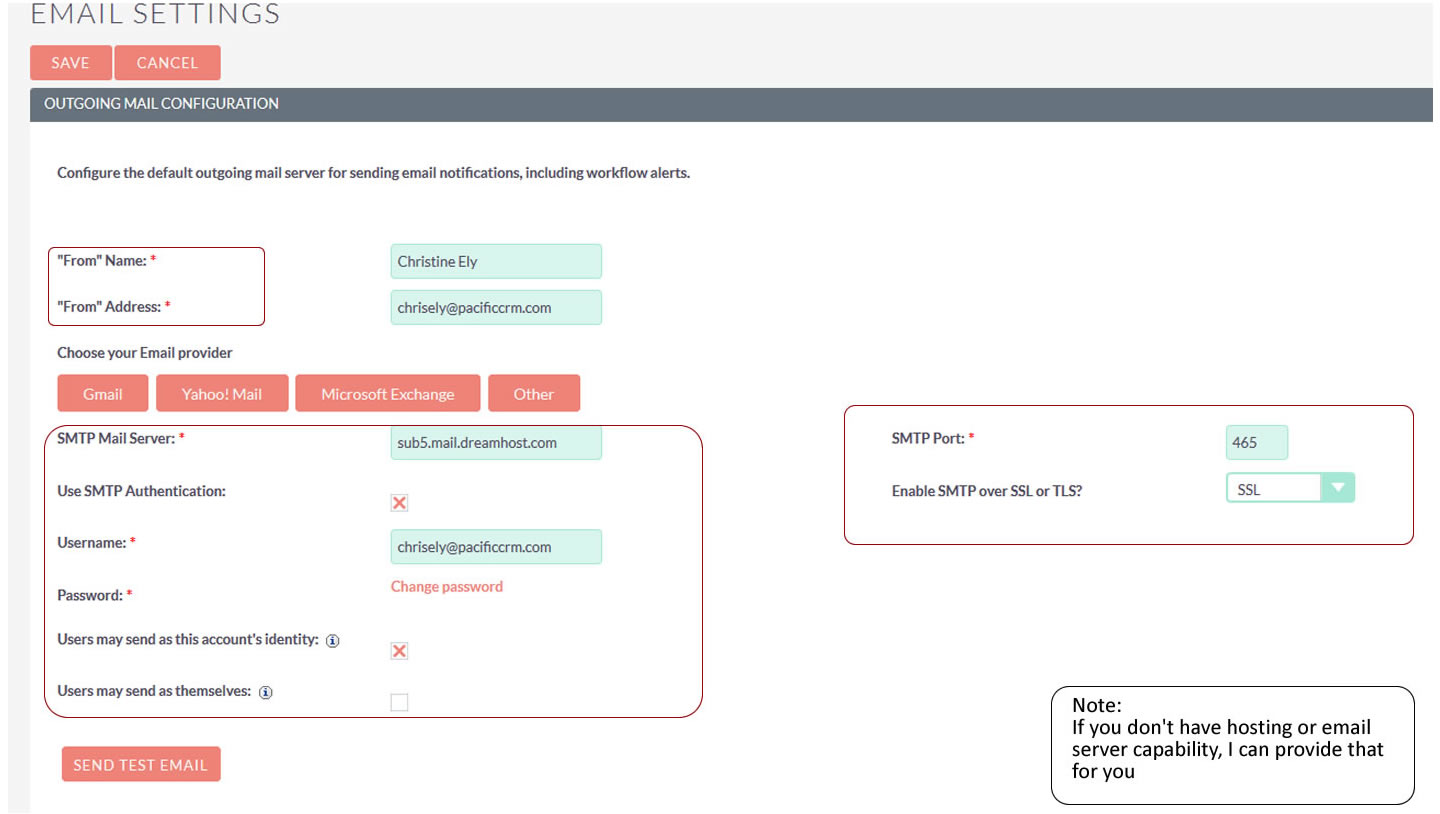
Head over to Admin, scroll down to Email Settings.

As you can see from my Outgoing Email setup screen, I have added my,

From Name: Christine Ely

From Address: chrisely@pacificcrm.com

I then entered the SMTP Mail Server credentials.  For my email I use Dreamhost but all hosting providers will provide instructions for the specific Mail Servers.

Ensure that you select ‘Enable SMTP over SSL or TLS?’.  For most users, SSL will be the preferred choice which automatically selects the default SMTP Port of 465.

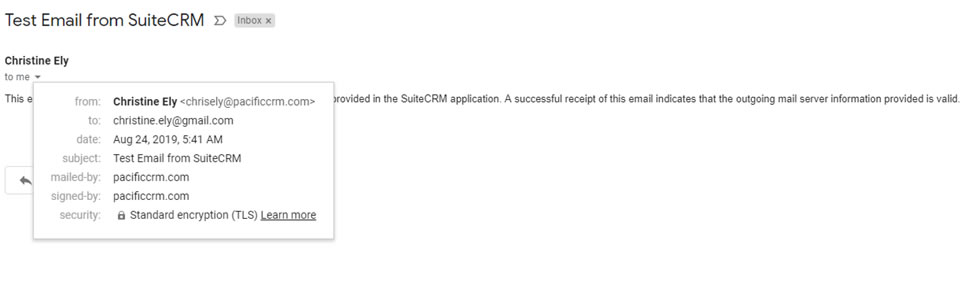
Once you have entered your credentials, it is a good idea to send a test email to confirm everything is working.  You can see the result of that in the email receipt screen shot:

When you get that, you know that you have correctly setup your Outgoing Email.

Filed Under: SuiteCRM

Website and CRM Integration – Your Organization’s Super Power

August 23, 2019 by chrisely

Customer Relationship Management (CRM) Software is arguably the most valuable software your company can utilize, but it is also the most misunderstood and under used.  A CRM system (such as SuiteCRM; which I specialize in) implemented correctly and used by all relevant departments has a dramatic influence on the company’s revenue and profit.  Increases in revenue, after just a few months, of well over 200% are commonplace.

Although the term CRM is now synonymous with software it is a concept that has been utilized for decades by companies that operate customer centric policies. It basically involves the processes and methodologies employed in managing the relationships between the company and the customer.

Anyone in business, and especially in sales, knows that customers are fickle creatures. They want to be looked after, nurtured, and made to feel special. A typical customer’s basic instinct is to be loyal. It’s like any relationship. It may not be everything you want but it’s familiar and comfortable. But just like a relationship, if you ignore and neglect your customers, they may get a roving eye… and your competitors are always out there trying to snap them up.

Startup companies  only have a few customers, so it’s possible for staff to remember and manage them with a minimum of technology. They will provide a good service, keep track of their orders, call them every now and again to see that they’re happy, send them thank you cards and so on. That’s effectively Customer Relationship Management.  But what if you have ten customers, fifty? Will you remember every aspect of every transaction? Will you remember to follow up on every call?

Just about every company, organization, club or group will have some kind of web presence.  For some, that may just be a Facebook page but for most, it will be a website.  Over the past decade, one web technology has dominated all of the others.  It is open source and free.  That system is WordPress and it’s a technology that anyone can learn in a single day and one almost every business should employ.

Most websites have a contact page and most of those contact pages have a form that visitors can fill in; which will send an email to the company behind the website.  If the company has any marketing savvy, they will take the details of that email and enter them into a database.  Sadly, many will just respond and then forget that contact.


If the website is integrated with a CRM system however, the contact form will trigger what is called a ‘workflow’ which can put into motion a whole series of events.  For example:

  1. The CRM system will send a personalize email back to the potential customer
  2. A copy of the contact request will be sent to the relevant department to respond
  3. A record will be created in the CRM’s ‘Leads’ module
  4. A call will be scheduled to follow up with the potential customer
  5. The person making the call to the potential customer will log against the record the interests of the potential customer and then either convert the ‘lead’ to a customer or mark the lead as potential for future business
  6. A follow-up email will be sent to the ‘lead’ to ensure that the customer received the best possible service
  7. A new workflow will then take over the management of that lead/customer based on the information from the follow-up

The point is, that lead will never be forgotten. The system will automatically pick up that lead based on the data and act upon it time and time again.

The purpose of CRM software is to enable your organization to manage multiple customers personally; to automate processes that ‘touch’ customers on a regular basis and then to remember every instance of every conversation, email, appointment, or transaction of any kind. All of these transactions are stored directly in your customer’s unique record so that your total relationship with that customer is always available.

Good CRM systems feature ‘Campaign Managers’, which can automatically create a sequence of tasks and events.

Let’s say you meet a bunch of people at an event who express an interest in your service. You’ll enter them into the CRM system and then allocate them to a specific campaign. A typical campaign (series of tasks and events to be posted to the person’s record) may be:

  1. Send an email to express how happy you were to meet the person
  2. In 1 day: Send a flyer or brochure of your services by mail
  3. In 3 days: Make a phone call to reconnect and confirm that your flyer was received and is there anything more you can do at this time.
  4. In 10 days: Send eNewsletter (and add to monthly newsletter mailing list)
  5. In 21 days: Invite to your own network meeting

And so on…

Multiple activities can be created and applied to existing customers, new prospects, network partners or anyone else in your database. The whole series of events is immediately applied to the customer record and the system updates all the relevant task lists, to-dos and appointment schedulers.

No matter how many customers or prospects you have, the CRM system will be managing the relationship, sending out reminders and thank you cards, emails, scheduling phone calls, remembering renewal dates and much more. And all of these events and transactions will be neatly filed against the individual customer records.

Good CRM systems are now ‘cloud based’; which means that the data is stored ‘online’ and accessible at any time via desktop computers, wifi enabled tablets, and mobile phones.

You may be a great networker and try to keep in touch with your customers, but no human can match the power and persistence of a CRM system.  Where, in the past, you may have neglected to follow up, thank, send out renewal applications, cross sale and up sale notifications, special offers, anniversary cards, newsletters and so on, your CRM system will methodically churn out personalized materials and your customers will continue to love you and do business with you.

CRM software has become an incredibly important category. How well you know your customer will determine how much business he or she will do with you. As Sir Francis Bacon once said, “Knowledge is Power”. That knowledge can be contained in your CRM system.

Filed Under: Business Operations, Marketing, Sonet Dynamics Blog, SuiteCRM

  • « Go to Previous Page
  • Page 1
  • Interim pages omitted …
  • Page 11
  • Page 12
  • Page 13

Copyright © 2026 · Sonet Dynamics llc · All Rights Reserved