• Skip to primary navigation
  • Skip to main content
CRM Junction – SuiteCRM Specialists

CRM Junction - SuiteCRM Specialists

The Home Of SuiteCRM Cloud Computing

  • Home
  • Features
  • Support Services
  • Training
    • Understanding Workflows
    • Understanding ‘The Cloud’
  • Pricing
  • Why SuiteCRM
  • Articles
  • Contact
    • Payments

SuiteCRM

The Power of Consistency and Continuity in CRM Software: Centralizing Business Communications for Success

May 16, 2023 by chrisely

Introduction:

In today’s fast-paced business environment, managing customer relationships efficiently and effectively is paramount to success. Customer Relationship Management (CRM) software has emerged as a powerful tool for businesses to streamline their operations, enhance customer interactions, and drive growth. However, the true potential of CRM software lies in its consistent and continuous utilization, combined with the centralization of all business communications. In this blog post, we will explore why consistency and continuity are key to the successful use of CRM software and why entering all business communications into the CRM is a game-changer for businesses.

  1. Creating a Single Source of Truth:

Consistency and continuity in CRM software ensure that all relevant information and communication related to customers are stored in a centralized system. By entering business communications into the CRM, such as emails, phone calls, meetings, and customer interactions, businesses create a single source of truth. This eliminates information silos and ensures that everyone in the organization has access to up-to-date and accurate customer data.

  1. Holistic Customer View:

When all business communications are recorded and entered into the CRM, it enables businesses to have a holistic view of each customer. Every interaction, from initial contact to ongoing support, is captured, providing a comprehensive understanding of customer preferences, needs, and history. This empowers businesses to personalize their communication, deliver better customer service, and build stronger, long-term relationships.

  1. Seamless Collaboration and Continuity:

Consistency in CRM usage promotes seamless collaboration within teams. When every team member enters their communication with customers into the CRM, it allows for smooth handoffs and continuity. Whether it’s a salesperson transitioning a lead to an account manager or a customer support representative following up on a previous issue, having access to the complete history of interactions ensures a consistent and personalized experience for customers.

  1. Data-Driven Decision Making:

Consistency and continuity in CRM usage result in a wealth of valuable data. By capturing and analyzing all business communications, businesses can extract meaningful insights that drive informed decision-making. Trends, patterns, and customer behaviors can be identified, helping businesses identify opportunities for growth, improve marketing strategies, and refine customer engagement initiatives.

  1. Enhanced Efficiency and Productivity:

By leveraging CRM software as the central hub for all business communications, businesses can streamline their workflows and enhance efficiency. Information is readily accessible, eliminating the need for manual searching and duplication of efforts. This saves time, reduces errors, and boosts overall productivity, allowing teams to focus on delivering exceptional customer experiences.

Conclusion:

Consistency and continuity are indispensable when it comes to successful CRM utilization. By entering all business communications into the CRM, businesses establish a centralized repository of information, foster collaboration, gain a holistic customer view, and make data-driven decisions. The benefits extend beyond improved customer relationships, leading to enhanced efficiency, productivity, and ultimately, business growth. Embracing consistency and continuity in CRM software usage is a key step towards unlocking the full potential of customer relationship management and staying ahead in today’s competitive landscape.

Sonet Dynamics specialize in SuiteCRM, the world’s most powerful open source CRM solution. Learn more here.


Filed Under: Sonet Dynamics Blog, SuiteCRM

OK, I Have A New Commercial Cleaning Business. Now What?

May 11, 2023 by chrisely

  1. Build a website: A professional website is a must-have for any business in today’s digital age. Your website should have information about your services, pricing, service area, and contact information.
  2. Claim your Google My Business listing: This will help your business show up in local search results when potential customers are looking for commercial cleaning services in your area.
  3. Create social media profiles: Social media is a great way to reach potential customers and build brand awareness. Create profiles on platforms like Facebook, Twitter, and LinkedIn and post regularly to showcase your services and expertise.
  4. Network with other businesses: Attend local business events, join your local chamber of commerce, and reach out to other businesses in your area to build relationships and generate referrals.
  5. Offer promotions: To attract new customers, offer promotions such as discounts on the first cleaning or a free consultation.

By taking these initial steps, you can begin to build your brand and attract new customers to your commercial cleaning business.

Filed Under: Business Operations, Marketing, Sonet Dynamics Blog, SuiteCRM, WordPress

Marketing Automation and CRM Case Studies Reveal An Average Revenue Increase Of 175.5% Following Implementation

August 30, 2019 by chrisely

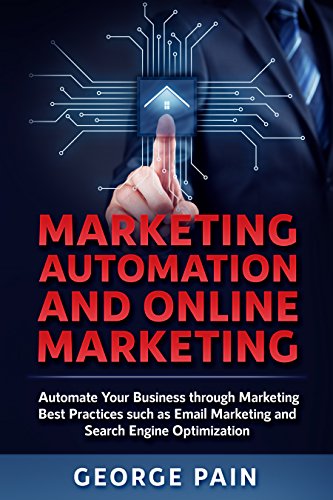
I recently read the book,  “Marketing Automation – Automate Your Business through Marketing Best Practices such as Email Marketing and search engine optimization,” by George Pain.  It’s not a long book but it provided some great insights and everything covered in this book can be implemented using SuiteCRM.


Pain detailed several case studies to illustrate how implementing CRM and marketing automation processes can dramatically improve business operations and profitability.

Of the ten case studies examined, six cited the impact to the revenue of the business. Four were expressed in percentage of revenue increased; one was expressed in a dollar increase in revenues to the business; one was expressed a percentage of company revenue attributed to the new CRM campaign.

Four Businesses Average 175.5% Increase in Campaign Revenue

1. One stationary specialist wanted to provide a more customized and personalized response based on customer behavior on their website. Their automated email campaign directed to landing pages with customized triggers realized a 244% increase in click rates and a 330% increase in revenue per mailing.

2. A software company utilized a lead scoring system to distinguish which leads to push to the sales team and which to cull. The volume of quality leads to the sales department increased by 55%, pre-qualified leads went up 30% and revenue grew by 178%.

3. A company that sells creative and artistic lifestyle products online to university students used CRM automation to better segment its young and diverse clients based on behavior.  An customized email campaign brought a 42% increase in duration of site visits, 20% more site page views and a 19% increase in email revenue.

4. An international news outlet saw potential leads lost from its sales funnel. The implemented an automated lead management system that better qualified leads, leveraged intelligent analytics and enabled a higher conversion rate, yielding a 23% increase in quality leads, a 72% drop in conversion time and a 175% increase in revenues attributed to marketing leads.

$2 Million Increased Revenue

5. A specialist in online registration, payment management and ticketing service implemented an automated lead nurturing solution to increase its visibility. Their email campaigns directed leads to customized landing pages cut marketing costs by 70%, time by 60%, netted a 350% increase in marketing ROI and a 100% growth in the automated sectors and an increase in gross revenue of $2 million.

$2 Million Increased Revenue

5. A specialist in online registration, payment management and ticketing service implemented an automated lead nurturing solution to increase its visibility. Their email campaigns directed leads to customized landing pages cut marketing costs by 70%, time by 60%, netted a 350% increase in marketing ROI and a 100% growth in the automated sectors and an increase in gross revenue of $2 million.

Percentage of Company Revenue

6. One mobile software company that provides B2B cloud mobile solutions, SmartBear Software, implemented an automated campaign that was scalable, integrated with the CRM program and easy to use. With email campaigns launched and lead management in place to handle the increasing volume, they cited a 200% increase in lead volume and 85% of revenue was generated by the downloads in the campaign.

Filed Under: Sonet Dynamics Blog, SuiteCRM

There Are No Excuses: Get The World’s Number 1 Open Source CRM Today

August 27, 2019 by chrisely

Everyone in business knows that a website is a key marketing component, and most also understand that they should also have a customer relationship management system of some kind.

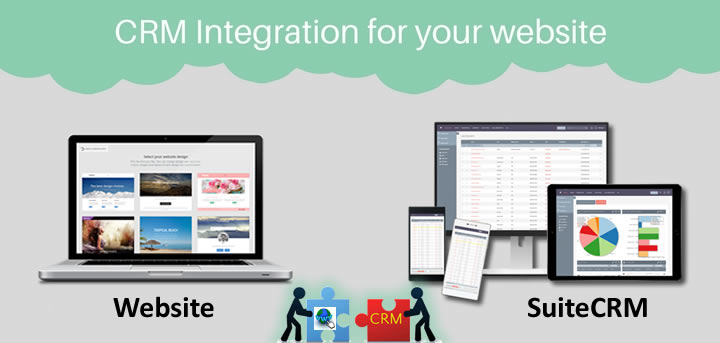
The fact is, businesses should have and integrate both into one seamless marketing system.

Everyone in business, regardless of how large or small their business is, should have a Customer Relationship Management system.  There is no excuse.

  • I have been told that staff won’t use a CRM system.  They like to do things their way and a CRM interferes with their process.
  • I have been told that a CRM system is too expensive or takes too long to learn.
  • I have been told that they have tried CRM and it just sat there.  They paid their fees but never got anything out of it.
  • I have been told many things but when it comes down to it, those are just excuses because CRM is not difficult to implement and it doesn’t have to be expensive.

So what exactly is CRM?

Customer Relationship Management (CRM) software is designed to manage your organization’s relationships and interactions producing greater control, predictability and profitability.

CRM began with a focus on relationships with leads or prospects and customers with the simple goal to improve customer relationships. But CRM has evolved to encompass much more. Now, more comprehensive CRM programs support several business areas, including:

  • marketing and sales management,
  • inventory management,
  • personnel management,
  • supplier/vendor management,
  • marketing and business intelligence management.

You can select which area(s) are the most suitable for your business.

Automate Communications and Processes and Increase Profit

An effective CRM system assists in staying connected to customers, automating and streamlining processes, and ultimately improving your bottom line.

SuiteCRM is at its heart a tool that handles contact management, sales management, productivity, workflows and automation of processes more efficiently and effectively than humans.

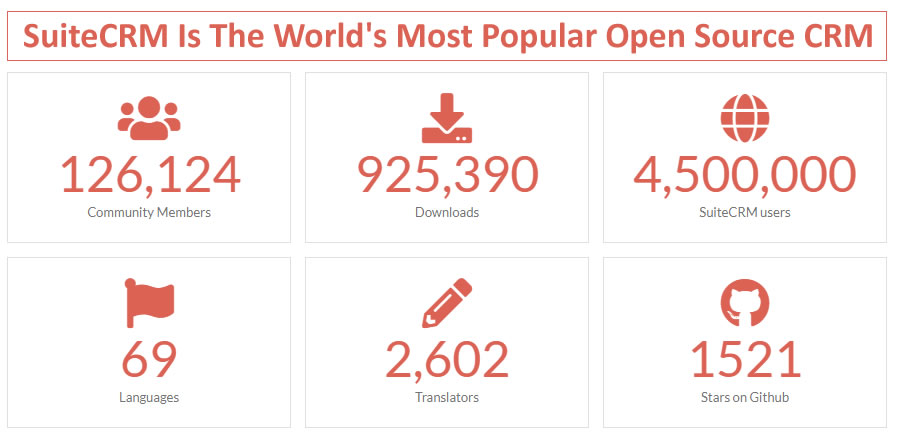
I specialize in the world’s number 1 ‘open source’ product, SuiteCRM because it is equal to or better than any branded products and it’s FREE.  SuiteCRM enables you to focus on your organization’s relationships with prospects, customers, service users, colleagues, friends and family, vendors or suppliers, as well as business processes.  If they’re people, SuiteCRM can manage your relationship with them.

Christine Ely – WordPress and SuiteCRM Consultant from Christine Ely on Vimeo.

There is a cycle that is at the heart every CRM system.  It’s your life-cycle with people and that includes all aspects of the relationship from finding new customers, winning their trust and business, to providing support and additional services throughout the relationship. Every interaction is recorded and logged so the whole relationship from the first contact is in the system.

SuiteCRM serves everyone in the organization.

From the person at the top to the new recruit, SuiteCRM serves the sales department, marketing, customer service, opportunity management, business development, personnel, recruitment, dispatch and every other area in any business.  It also serves external interactions through customer portals and ticket management.

SuiteCRM is vast but so intuitive.

It is the place where you store customer and prospect contact information, identify sales opportunities, manage and record service issues, and of course automate and manage marketing campaigns.  Every successful business has a system in place and most of those systems are just manual practices.  SuiteCRM puts those practices into one place and it makes available all of that information to anyone in the company that has a need for it.

SuiteCRM is the ultimate collaboration tool. 

As SuiteCRM stores all interactions with your customers, and everyone in your company has access to the information they need from it, collaboration and productivity naturally increases.  When a customer calls, no matter who takes that call, he or she can see how the customer has been communicated with, see their previous purchases and when they purchased, whether they have had prior support tickets, whether they paid on time and so on.

SuiteCRM helps your business drive growth.

If you want a business that will grow and last, you need a sustainable strategy; one that can handle growth.  You need a system that will run the business whether you are there or not. You need a system that will take your business into the future.  You need to set goals, sales targets and business objectives and of course, you need to ensure that your business makes a profit.

SuiteCRM system features reports and dashboards’

SuiteCRM offersa clear overview of how your business is doing and again, all that information is in one place.  You’ll see the status of leads, orders, customer service issues, the sales pipeline, notes, outstanding tasks, status of projects and much more. You’ll be able to simultaneously monitor multiple campaigns, know where your prospect is in the funnel and what’s coming next.

SuiteCRM’s Superpower! Automated workflows.

Workflows schedule series of events to take place when certain actions are triggered.  A SuiteCRM workflow can take action whenever a contact form is completed on your website.  When a lead is created SuiteCRM will trigger actions. These could be to email back the potential customer thanking them for their contact and informing them that someone will be contacting them soon (as well as suggesting areas of the website to review) but then also emailing the relevant department, creating action tasks for appropriate personnel.  That lead will be managed throughout the workflow from first order and every interaction in the relationship into the future.

Filed Under: Sonet Dynamics Blog, SuiteCRM

SuiteCRM Essentials – Web Forms

August 26, 2019 by chrisely

Every website has a contact form but for the most part, that form just sends an email to the website contact with the information from that form.

SuiteCRM is different in that it creates a record in SuiteCRM and that records can be acted upon but Workflows.

SuiteCRM has 3 modules that can be used to receive information from webforms.  They are:

  1. Leads
  2. Contacts
  3. Targets

We will go into more detail on these modules in a later lesson but for now we’ll create the webform for ‘Leads’.

SuiteCRM has a set of standard fields for all of these modules but you can add additional fields through the use of user-definable fields.

I always like to have a little bit of extra information in a webform to find out what type of interest my visitor has in visiting my website so I’m going to add a drop-down list to the webform; which will later be acted upon by a workflow.

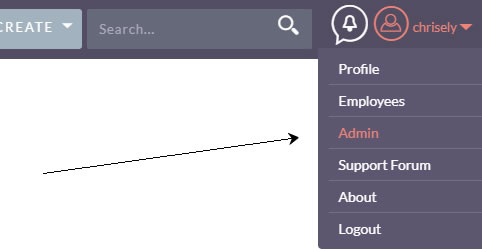
First thing to do is head to ‘Admin’, note, you need admin rights to access the admin area of SuiteCRM.

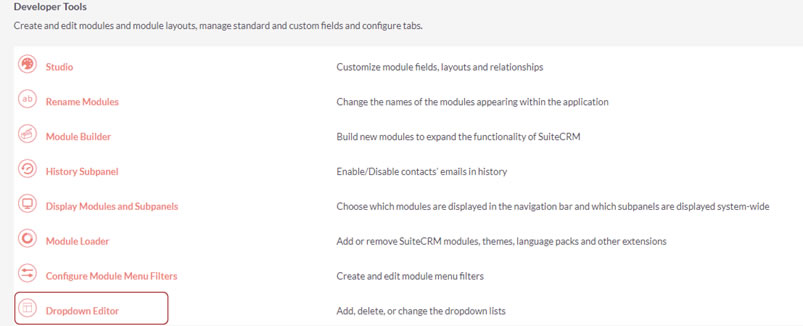
From Admin, scroll down to the Developer Tools and select Dropdown Editor.

You’ll notice there are already a lot of dropdowns in use within the system so it’s worth taking a look at some of them to see what there.  Every dropdown can be used multiple times for user-defined fields.

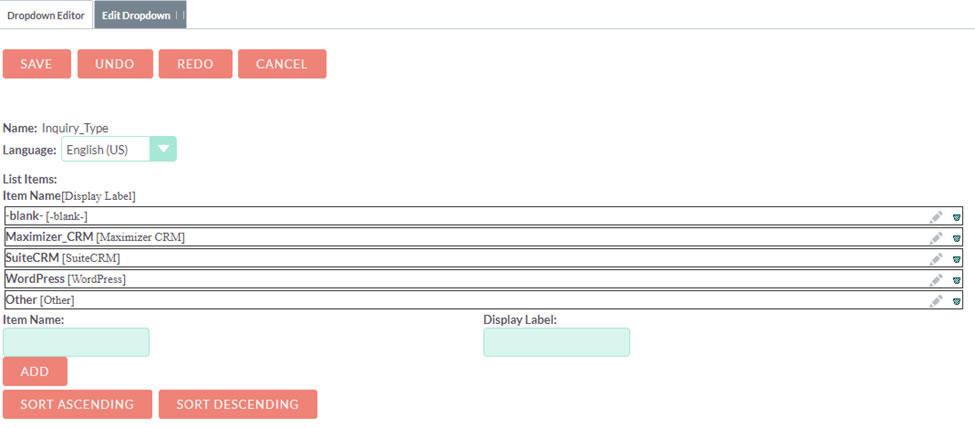
We’re going to add a new drop-down called Inquiry Type:

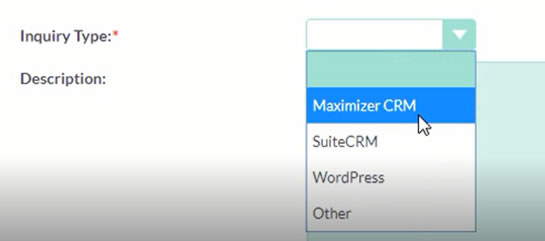
I want to know from the visitor what their interest is so I’m giving them a choice of Maximizer CRM, SuiteCRM. WordPress or Other.  I am also adding a ‘blank’ response.  This is added by clicking on ‘Add’ with nothing in the ‘Item Name’.  Adding a blank field prevents another field from being the ‘default’ response.

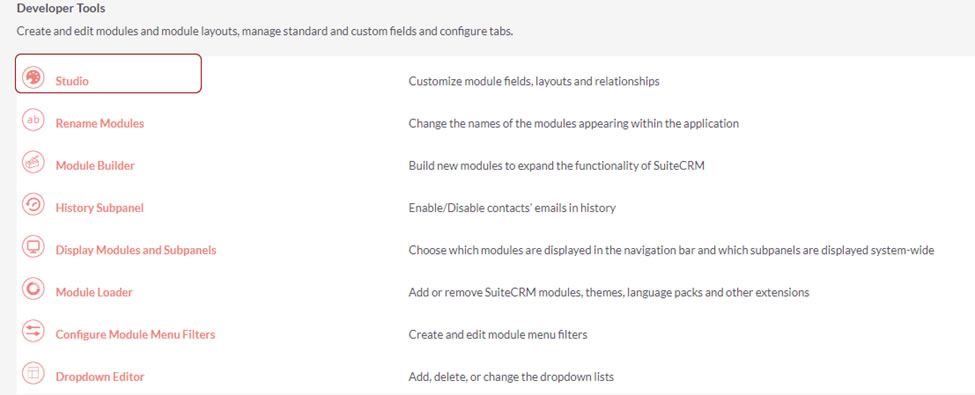
Once we have created our new Dropdown list, we should head over to the ‘Studio’ to add this to the ‘Leads’ module.

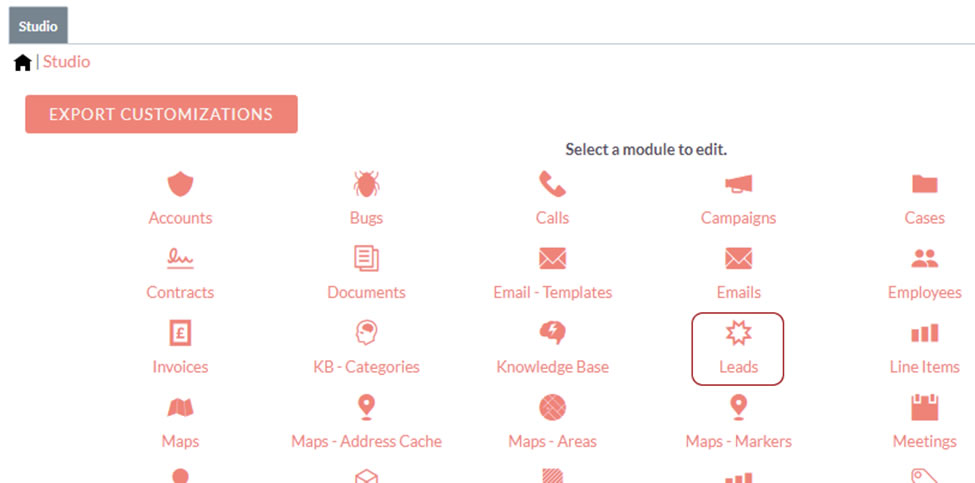
From the Developer Tools, select Studio

Then from Studio, select Leads.

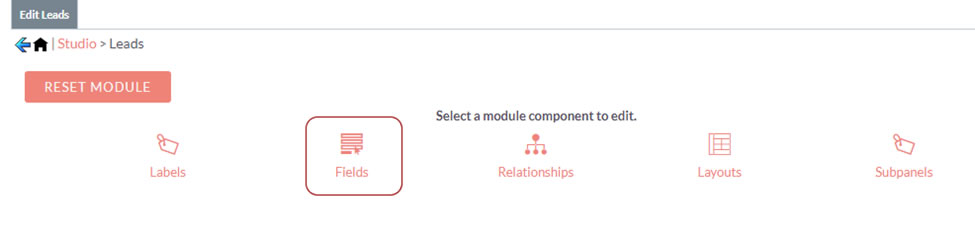
Click on Fields,

Then Add Field:

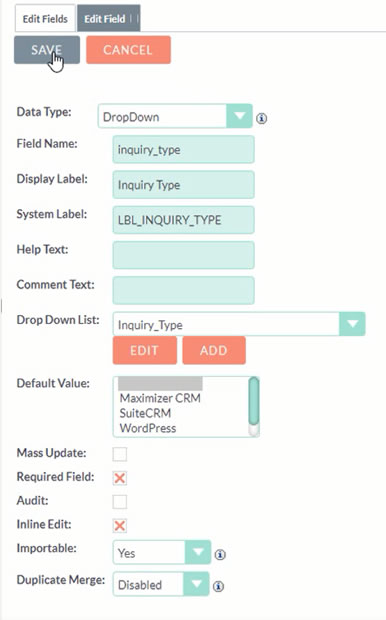
Select Data Type, Dropdown and from the dropdown list select the dropdown you just created.

Name your field (Note, field names cannot have spaces so use the underscore).  The Display Label can have spaces.  Let’s make this a required field, then…

Save the new field.

Now head back to Leads.  We have to make that field available to the record itself.

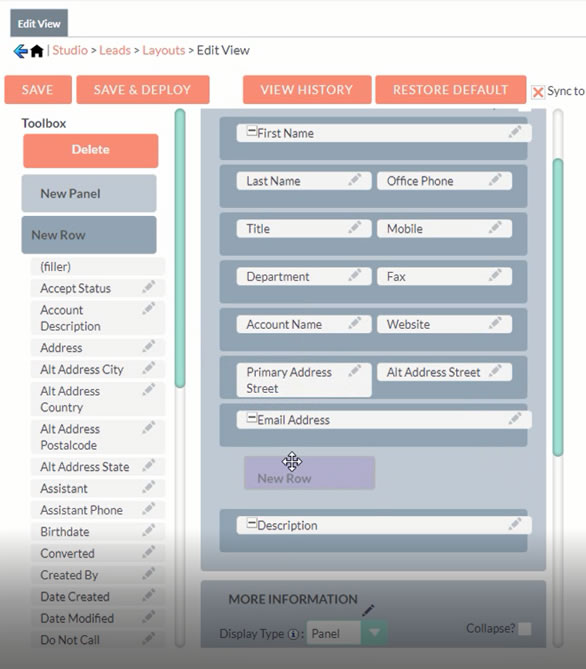
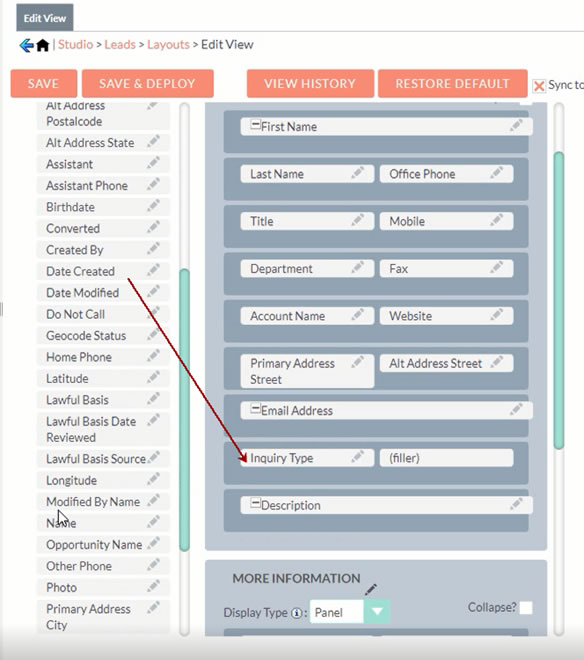
From Studio/Leads, Select Layouts. From there, select Edit View.

Now click the ‘Sync To Detail View’ check box.  That ensures that any changes we make in Edit Mode also update the Detail View; which is what you actually see in the record.

Editing records in SuiteCRM is a breeze.  Everything is ‘drag and drop’.

To add our dropdown field, we want to add an extra row to the record structure so grab the record object and drag it down to where you want to field to appear.

Once in place we can drag the newly created field to a slot in the new row.

Now click ‘Save & Deploy’

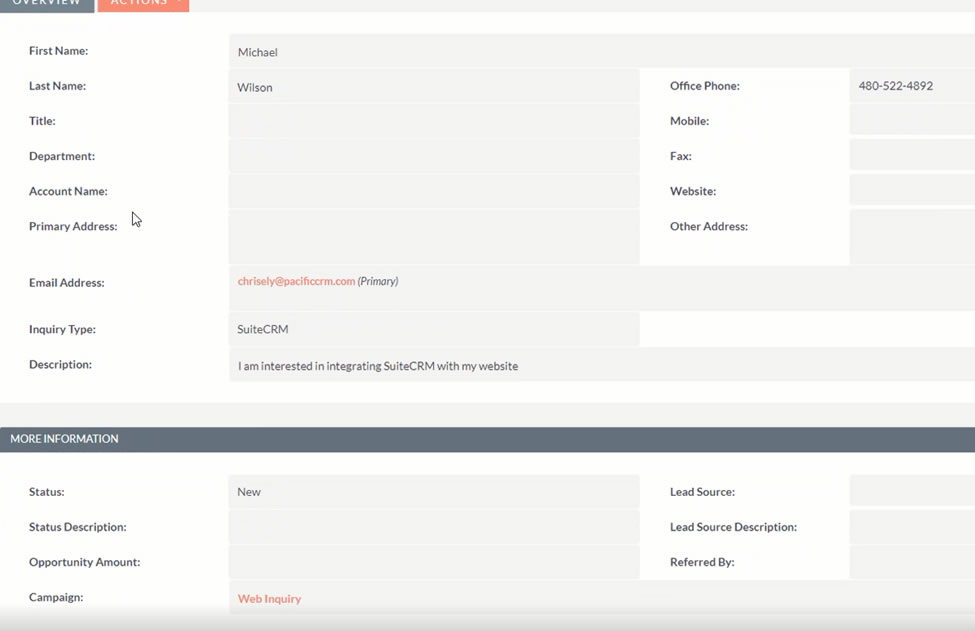
That field now appears in the Leads Module:

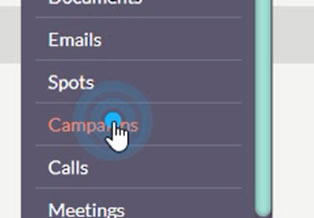
Now that we have all of the fields we want for our webform, we can create it.  Webforms are created from the Campaigns module so from the menu, select Campaigns.

We are going to create a campaign but not put any details into it for now.  We will be going into more depth on campaigns in a later lesson.  We just want the campaign name for the webform.

Click on Create Campaign, select type ‘Email’ and name the Campaign.  This will be used for the workflow in the next lesson.

Click Next to save the campaign then click on Create Person Form (Webform)

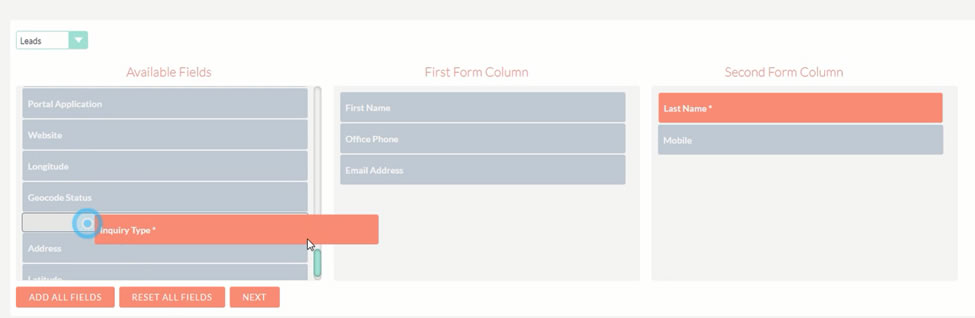
This presents us with a drag and drop screen that allows us to literally drag and drop the fields into the columns we wish to include into our webform.

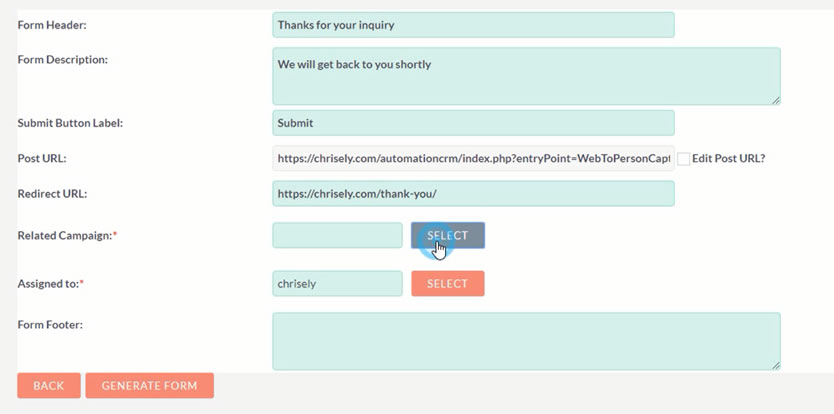
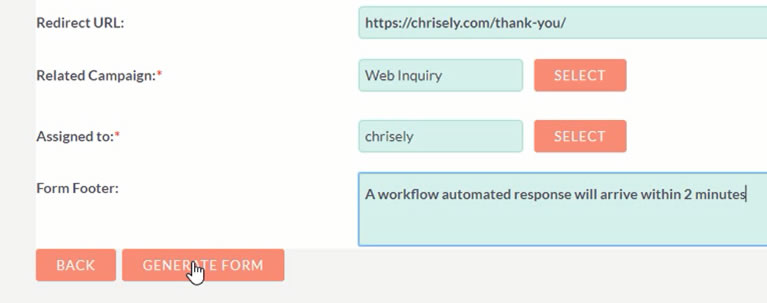
Now we add the headings and details to the form:

Including the Form Header, Description, Redirect URL (where to direct the visitor once the form has been completed) and which Campaign we want to attach the webform to.  This is important for the Workflow and to identify the source of the record

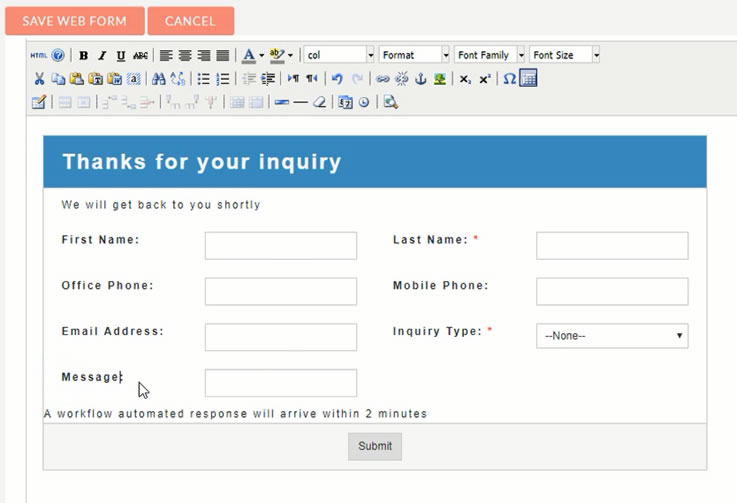
This will take you to the editor where you can tweak the form and makes some last minute changes to how the form appears to your visitors:

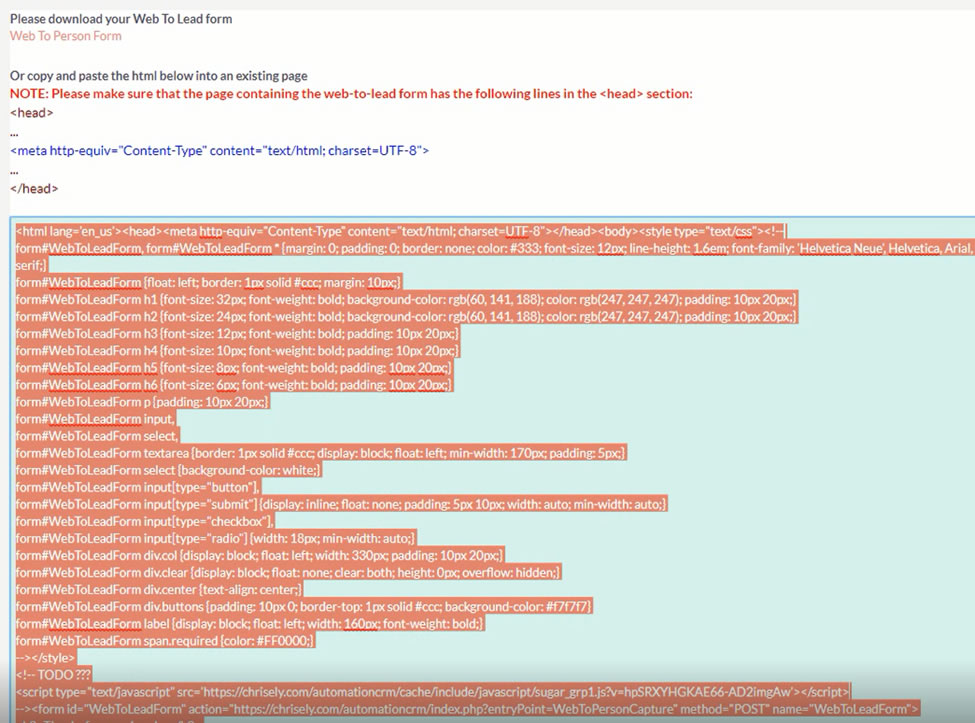
When everything is as you want it, click Save Webform to generate the code for your website Contact page.

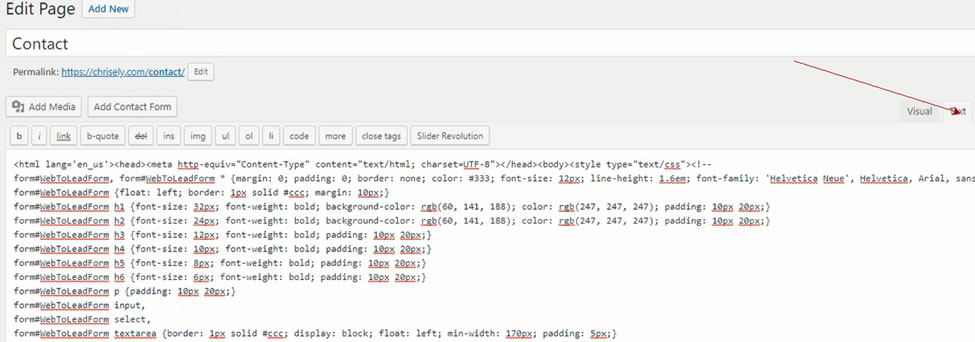
You can now embed this code into your website page.  If you’re using WordPress, click on the Text Tab, then paste the code into the page:

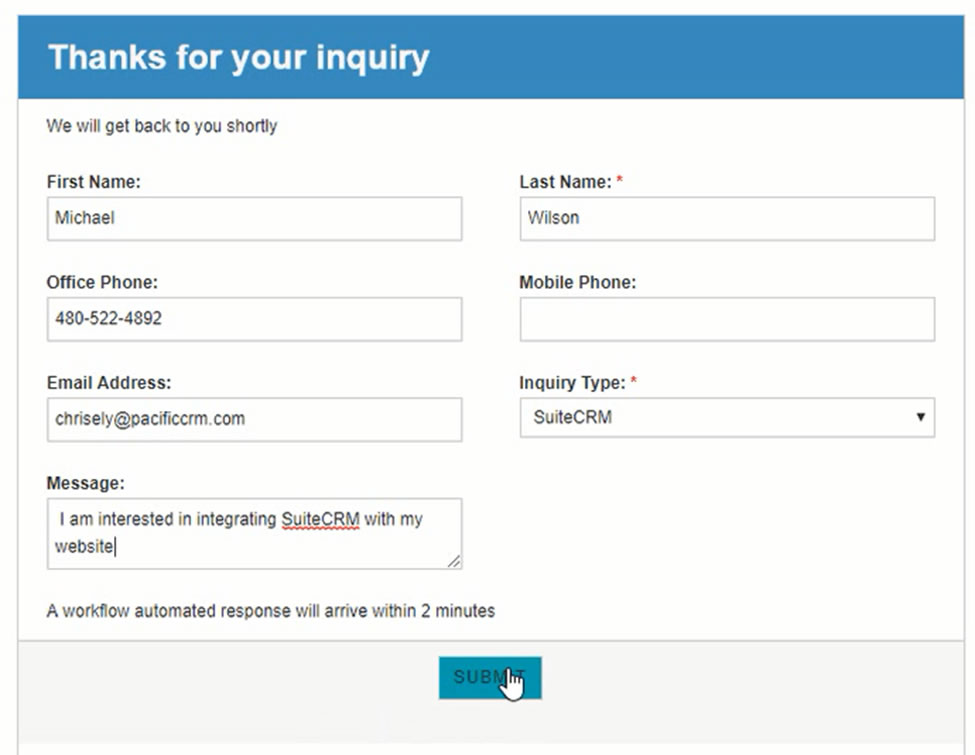
Publish the page and your new Webform will be active:

Completing the form and clicking submit will create the record in SuiteCRM

In my next lesson, we will create a Workflow to take action on this new record.


Filed Under: SuiteCRM

  • « Go to Previous Page
  • Page 1
  • Interim pages omitted …
  • Page 10
  • Page 11
  • Page 12
  • Page 13
  • Go to Next Page »

Copyright © 2026 · Sonet Dynamics llc · All Rights Reserved