• Skip to primary navigation
  • Skip to main content
CRM Junction – SuiteCRM Specialists

CRM Junction - SuiteCRM Specialists

The Home Of SuiteCRM Cloud Computing

  • Home
  • Features
  • Support Services
  • Training
    • Understanding Workflows
    • Understanding ‘The Cloud’
  • Pricing
  • Why SuiteCRM
  • Articles
  • Contact
    • Payments

Marketing

How to Track Your Sales Opportunities and Close More Deals with SuiteCRM 8

July 16, 2023 by Scott Scholz

The Opportunities module in SuiteCRM 8 is used to track sales opportunities. An opportunity is a potential sale that has a good chance of being closed. The module allows you to track the progress of each opportunity, as well as the associated costs and revenue.

To use the Opportunities module, you first need to create an opportunity record. This record will include the following information:

  • Account: The account that the opportunity is associated with.
  • Contact: The contact person for the opportunity.
  • Stage: The stage of the sales process that the opportunity is in.
  • Amount: The estimated amount of the sale.
  • Close Date: The date that the sale is expected to close.

Once you have created an opportunity record, you can track its progress by updating the stage and close date. You can also add notes and attachments to the record.

The Opportunities module also allows you to track the costs and revenue associated with each opportunity. This information can be used to calculate the profitability of your sales pipeline.

To access the Opportunities module, you can click on the Opportunities tab in the SuiteCRM menu. This will take you to the List View, where you can see a list of all your opportunities. You can also use the Search form to find specific opportunities.

The Opportunities module is a powerful tool that can help you track your sales opportunities and improve your sales performance. By using the module effectively, you can increase your chances of closing more deals and growing your business.

Here are some additional tips for using the Opportunities module:

  • Use the Stage field to track the progress of your opportunities. This will help you stay organized and make sure that you are following up on opportunities in a timely manner.
  • Set realistic close dates for your opportunities. This will help you avoid missing deadlines and keep your sales pipeline on track.
  • Track the costs and revenue associated with your opportunities. This information can be used to calculate the profitability of your sales pipeline and identify areas where you can improve your sales process.
  • Use the Notes and Attachments fields to keep track of important information about your opportunities. This information can be used to refer back to later or to share with other members of your sales team.

The Opportunities module is a valuable tool that can help you improve your sales performance. By following these tips, you can get the most out of the module and close more deals.
Filed Under: Marketing, Sonet Dynamics Blog, SuiteCRM

Holistic Data: Unleashing Productivity with the SuiteCRM Dashboard

July 13, 2023 by chrisely

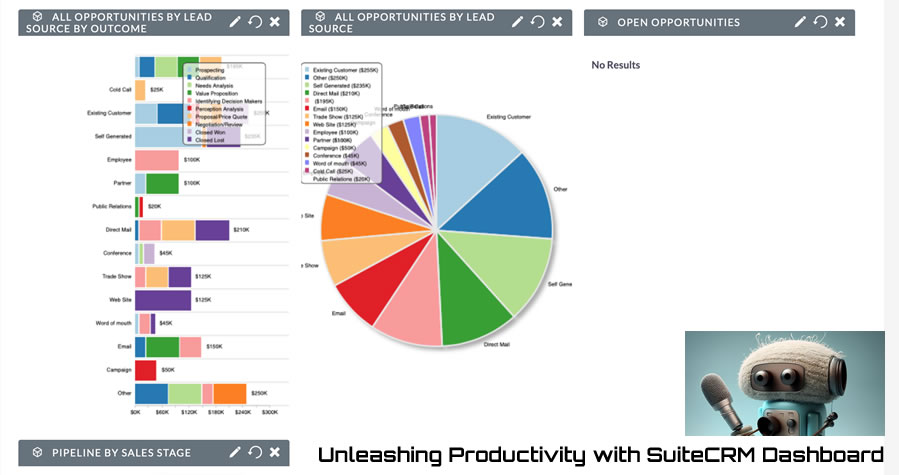
Staying organized and effectively managing information is paramount to any business. SuiteCRM, the leading open-source CRM solution, offers a powerful tool—the SuiteCRM Dashboard—to centralize and streamline your day-to-day operations. With its customizable interface and versatile features, the SuiteCRM Dashboard provides a comprehensive overview of all your tasks, appointments, leads, calendars, opportunities, phone calls, call lists, and more, allowing you to optimize your productivity and make informed decisions.

A Holistic View of Your Data: The SuiteCRM Dashboard serves as a centralized hub, providing you with a bird’s-eye view of your essential data and activities. From the Dashboard, you can effortlessly monitor multiple modules simultaneously. With customizable dashlets, you can add and arrange various components, such as charts, lists, and reports, specific to your needs. Want to see your upcoming appointments, tasks, and leads all at once? No problem. The SuiteCRM Dashboard allows you to add multiple dashlets of the same module but with different filters, enabling you to focus on specific subsets of data.

Enhancing Decision-Making with Filtering: One of the key benefits of the SuiteCRM Dashboard is the ability to filter information within each dashlet. By applying filters, you can gain different perspectives on your data, helping you uncover valuable insights and make data-driven decisions. For example, within the Opportunities dashlet, you can filter by stage, owner, or date range, giving you a clear overview of your sales pipeline and helping prioritize your efforts.

Custom Tabs for a Personalized Experience: To further enhance your productivity, SuiteCRM Dashboard allows you to create multiple tabs. Each tab can have a unique combination of dashlets, providing you with a customized view of the data that matters most to you. For instance, you can have a tab dedicated to your sales activities, another for customer support, and yet another for marketing campaigns. This flexibility allows you to focus on specific aspects of your business with ease, eliminating the clutter and providing a personalized experience.

Access External Sites and Data: The SuiteCRM Dashboard goes beyond CRM functionality by allowing you to integrate external sites and data directly into the interface. By incorporating relevant external information, such as news feeds, social media streams, or key performance indicators (KPIs), you gain a comprehensive perspective on all the relevant data in SuiteCRM, all from your point of view. This seamless integration saves you time and ensures that you have the most up-to-date information at your fingertips.

The SuiteCRM Dashboard is a powerful tool that empowers businesses to maximize productivity and gain valuable insights. With its customizable layout, multiple dashlets and tabs, and filtering capabilities, you can personalize your dashboard to suit your unique needs and optimize your workflow. By centralizing your tasks, appointments, leads, calendars, and other critical data, the SuiteCRM Dashboard enables you to stay organized, make informed decisions, and effectively manage your day-to-day operations. Take advantage of this invaluable tool and unlock the full potential of your SuiteCRM experience.

Filed Under: Marketing, Sonet Dynamics Blog, SuiteCRM

Streamline Sales and Marketing with SuiteCRM Document Management System

July 11, 2023 by chrisely

Having quick and easy access to sales and marketing materials is crucial for the success of any organization. SuiteCRM’s powerful Document Management System offers a comprehensive solution for businesses, providing a centralized repository for all sales and marketing materials.


  1. Centralized Storage and Accessibility:

SuiteCRM’s Document Management System serves as a centralized hub to store all sales and marketing materials. Whether it’s sales sheets, brochures, presentations, or marketing collateral, everything can be organized and stored within SuiteCRM. This eliminates the need for multiple storage systems and ensures that all documents are easily accessible to the sales and marketing teams from a single location.

  1. Categorization and Sub-Categorization:

The Document Management System in SuiteCRM allows for efficient categorization and sub-categorization of documents. This categorization can be based on various criteria such as product lines, target audience, marketing campaigns, or any other relevant classification. With a well-structured categorization system, users can easily locate the specific documents they need, saving time and effort.

  1. Seamless Integration into Regular and Automated Mailings:

SuiteCRM’s Document Management System seamlessly integrates with email functionalities, allowing sales and marketing teams to incorporate relevant documents into their regular and automated mailings. Whether it’s sending out sales proposals, marketing newsletters, or support documentation, the system streamlines the process by providing easy access to the required documents. This ensures consistent and professional communication with prospects, customers, and partners.

  1. Wide Range of Document Formats:

SuiteCRM’s Document Management System supports various document formats, including Word documents, Excel spreadsheets, PDF files, and more. This versatility allows businesses to store and utilize a wide range of documents for various purposes. From sales presentations to marketing reports, educational resources to support documentation, all types of materials can be stored and accessed within the system.

  1. Role-Based Access Management:

SuiteCRM’s Role-Based Access Management feature ensures that documents are accessible only to authorized individuals or groups within the organization. Sales and marketing teams can define specific roles and permissions, granting access to relevant documents based on user requirements. This enhances security and confidentiality while ensuring that the right materials are available to the right teams.

The SuiteCRM Document Management System provides an invaluable asset to businesses, particularly to sales and marketing teams. By centralizing sales and marketing materials in one location, categorizing documents, and seamlessly integrating them into regular and automated mailings, businesses can streamline their processes and enhance productivity. With support for various document formats and role-based access management, SuiteCRM empowers businesses to efficiently store, organize, and distribute documents for sales, marketing, support, and educational purposes. Embrace the SuiteCRM Document Management System and unlock the potential for improved efficiency, enhanced collaboration, and successful sales and marketing endeavors.

Filed Under: Marketing, Sonet Dynamics Blog, SuiteCRM

SuiteCRM Case Study: Transforming Customer Engagement for a Thriving Liquidation Store

July 6, 2023 by chrisely

In this case study, we explore how SuiteCRM, the leading customer relationship management system, revolutionized the operations of a local liquidation store. By leveraging SuiteCRM’s robust features, the store successfully gathered new customers, implemented automated marketing campaigns, and fostered loyalty among its existing customer base. Let’s delve into how SuiteCRM transformed their customer engagement strategies and contributed to their overall success.

Challenge:

The liquidation store aimed to expand its customer base within the local area and enhance customer loyalty. They sought an efficient system to manage customer records, automate marketing processes, and execute targeted email campaigns. The store recognized the need for a comprehensive CRM solution to streamline operations, increase customer engagement, and maximize their marketing efforts.

Solution:

SuiteCRM emerged as the ideal solution for the liquidation store’s needs. By implementing SuiteCRM, they gained a robust platform to manage customer records, automate marketing campaigns, and execute personalized email campaigns. The suite of features and capabilities within SuiteCRM empowered the store to transform their customer engagement strategy and achieve their objectives.

  1. Customer Record Management:

SuiteCRM served as a centralized hub to store and manage customer records. The liquidation store could effortlessly capture and organize customer information, including email addresses, mobile numbers, and purchase history. The ability to maintain a comprehensive database enabled them to better understand their customer base and tailor their marketing initiatives accordingly.

  1. Automated Marketing Campaigns:

SuiteCRM’s automation capabilities were instrumental in driving targeted marketing campaigns for the liquidation store. Leveraging the power of SuiteCRM, they could automate various marketing activities, such as sending personalized emails, delivering promotions and offers, and nurturing customer relationships. The store maximized their marketing efficiency while ensuring consistent and timely communication with their audience.

  1. Targeted Email Campaigns:

SuiteCRM enabled the liquidation store to execute highly targeted email campaigns, tailored to specific customer segments. By leveraging the rich customer data within SuiteCRM, they could create personalized content, showcase relevant liquidation items, and deliver enticing offers directly to their customers’ inboxes. This personalized approach boosted customer engagement, encouraged repeat purchases, and fostered loyalty.

  1. Loyalty Programs and Customer Retention:

With SuiteCRM, the liquidation store implemented effective loyalty programs to retain and reward existing customers. They could easily track customer interactions, identify high-value customers, and offer exclusive incentives and discounts. By nurturing existing relationships and providing exceptional customer experiences, the store fostered loyalty and maximized customer lifetime value.

Results:

By leveraging SuiteCRM, the liquidation store achieved remarkable results:

  1. Expanded Customer Base: SuiteCRM’s targeted marketing campaigns and personalized email initiatives attracted new customers within the local area, expanding the store’s customer base.
  2. Increased Customer Engagement: SuiteCRM enabled the store to deliver relevant content, exclusive promotions, and personalized recommendations, resulting in heightened customer engagement and increased sales.
  3. Enhanced Customer Loyalty: The implementation of loyalty programs and personalized offers through SuiteCRM fostered customer loyalty and encouraged repeat business, ultimately driving revenue growth.
  4. Streamlined Operations: SuiteCRM’s centralized customer database and automation capabilities streamlined the store’s operations, improving efficiency and empowering staff to focus on customer satisfaction.

SuiteCRM proved to be a game-changer for the liquidation store, revolutionizing their customer engagement and overall business performance. By utilizing SuiteCRM’s robust features, the store successfully gathered new customers, implemented automated marketing campaigns, and fostered loyalty among their existing customer base. SuiteCRM’s ability to manage customer records, automate marketing processes, and execute targeted email campaigns empowered the liquidation store to thrive in a competitive market, solidifying its position as a leader in the industry.

Filed Under: Business Operations, Marketing, Sonet Dynamics Blog, SuiteCRM

From Home to High Productivity: Harnessing CRM Tools for Remote Workforce Management

July 4, 2023 by Scott Scholz

With the trend of employees now choosing to work away from the office, a company’s Customer Relationship Management (CRM) program can be utilized to monitor the productivity of workers who work from home. Here’s how:

  1. Activity Tracking: A CRM program can track the activities performed by remote workers. It can log various actions such as calls made, emails sent, meetings scheduled, and tasks completed. By capturing these activities, the CRM provides a comprehensive view of a worker’s engagement and productivity.
  2. Task Management: Many CRM systems include built-in task management features. Remote workers can use these tools to create, assign, and update tasks. Managers can then monitor the progress of these tasks, check completion rates, and identify potential bottlenecks or issues.
  3. Performance Metrics: CRM programs often offer performance metrics and reports that provide insights into individual and team productivity. Managers can analyze these metrics to measure the performance of remote workers objectively. For example, they can examine metrics like the number of deals closed, customer response time, or customer satisfaction ratings.
  4. Communication Tracking: With remote work, effective communication becomes crucial. A CRM system can integrate with various communication tools such as email clients, chat platforms, or video conferencing software. By capturing communication data, managers can assess the frequency and quality of remote workers’ interactions with colleagues and clients.
  5. Data Analytics: CRM systems enable data analysis to identify patterns, trends, and correlations related to productivity. By leveraging analytics capabilities, managers can gain insights into how remote workers are performing, identify areas for improvement, and make data-driven decisions to optimize productivity.
  6. Performance Reviews and Feedback: CRM platforms can facilitate performance reviews and feedback sessions. Managers can use the CRM to record performance-related notes, create evaluation templates, and schedule feedback sessions with remote workers. This ensures consistent performance assessment and helps remote employees understand their strengths and areas that require improvement.
  7. Goal Setting and Tracking: CRM systems can be used to set performance goals for remote workers and track their progress. This allows managers to align remote employees’ objectives with the overall company goals and ensure that they stay focused and accountable.
  8. Collaboration and Knowledge Sharing: Some CRM programs provide collaborative features such as document sharing, knowledge bases, and team forums. These features facilitate virtual collaboration among remote workers, enabling them to share best practices, exchange information, and collectively solve problems, which can contribute to increased productivity.

It is important to note that while CRM programs can assist in monitoring remote workers’ productivity, it should be implemented with transparency, trust, and clear communication. Employees should be aware of the monitoring processes and the intended purpose of using the CRM system to ensure a healthy work environment and avoid privacy concerns.

Sonet Dynamics is an expert in the world’s number 1 open source system, SuiteCRM.

Filed Under: Business Operations, Marketing, Sonet Dynamics Blog, SuiteCRM

  • « Go to Previous Page
  • Page 1
  • Page 2
  • Page 3
  • Page 4
  • Page 5
  • Go to Next Page »

Copyright © 2026 · Sonet Dynamics llc · All Rights Reserved